


Hi, I’m Greg 👋! I write weekly product essays, including system “handshakes”, the expectations for workflow, and the jobs to be done for data. What is Data Operations? was the first post in the series.
This week’s toy: cartographers who hid illustrations in official swiss maps… for decades. Those are some impressive doodles.
Edition 280 of this newsletter is here - it’s December 8, 2025.
Thanks for reading! Let me know if there’s a topic you’d like me to cover.
The Big Idea
A short long-form essay about data things
⚙️ If your AI seems wrong, check your knowledge base
Answering customer questions with AI is a hot topic these days.
Set the context of your company, ingest some content from a knowledge base or documentation site, and you should be good to go almost immediately (if you believe the marketing hype).
Next, test your question-answering bot by asking it questions like a customer.
Pretty soon you’ll realize a few things:
wow, this tech really works! It produces reasonable answers to a lot of surface questions really quickly and accurately
this tech helped me find an inaccurate piece of information in my knowledge base that no one has pointed out for quite some time
some of our content between our knowledge base and our documentation is mismatched
AI chatbots are effective vacuums of information, made to “blenderize” your content into embeddings that show the nearest concept to the item you’re searching.
If your content is well-organized and contains a strong information architecture, the answers will flow naturally and it will feel like “talking with the documentation”. If the information is inconsistent, that question-asking and answering activity will also feel disjointed.
Having worked on this problem, I have some ideas on how to improve the information journey for customer with a few tactics learned from vibe-coding with LLMs and also in designing hundreds of help centers a decade ago.
These tactics mirror the same work you’d do in designing other kinds of help experiences, with the additional wrinkle that you know your reader is going to build a mind map or information graph automatically.
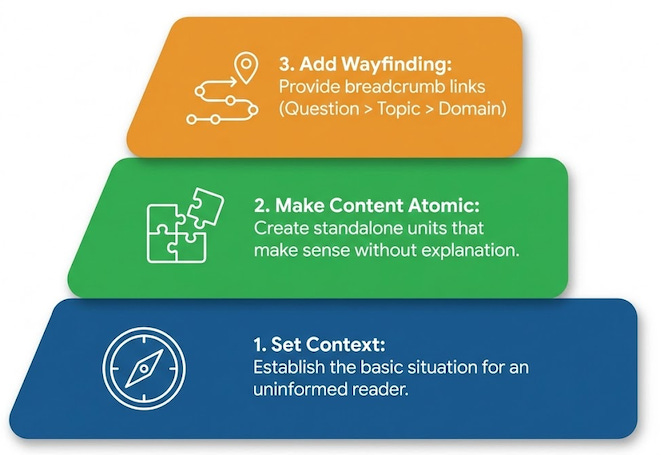
Set the context for an uninformed reader
Make the content atomic
Provide bread-crumbs and links based on the skill or topic
Assume the reader is visiting for the first time
Right now, check out a documentation site that you really admire. (You might not have one in mind, but let’s check out Stripe, a developer tool that helps businesses take payment on the internet).
Start by going to Stripe’s page that helps you set up no-code payment links.
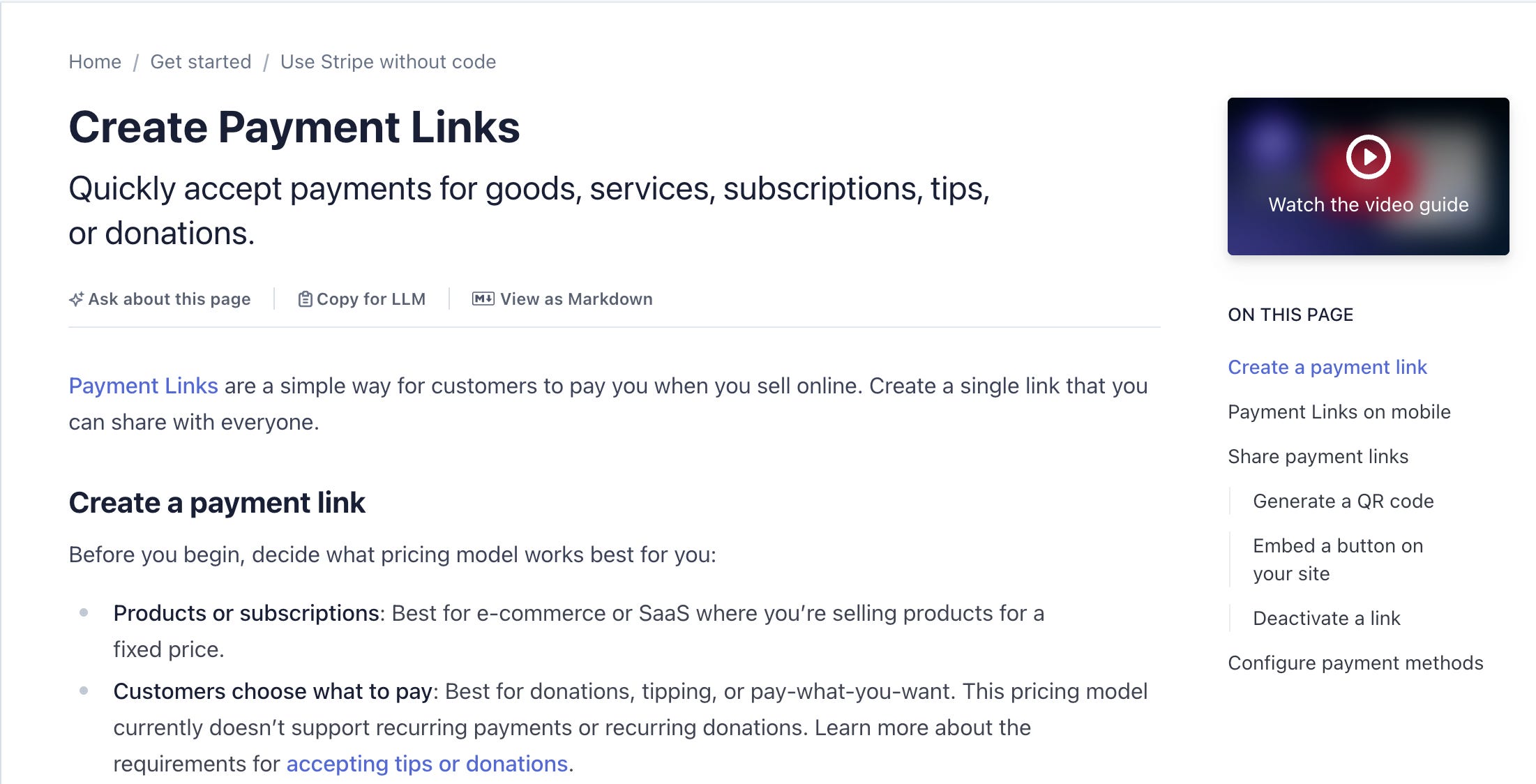
What do you notice the minute you land here?
A really strong title, anchored by a verb (”Create Payment Links”) and a subtitle that tells you exactly why you’re here: “[q]uickly accept payments for goods, services, subscriptions, tips, or donations.”
If you didn’t know what Stripe does and you landed here, you have at least one very clear use case that tells you how to proceed.
For the sequence-oriented, Stripe adds a few ordered lists telling you how to get started. They also switch modalities by explaining capabilities in short, active sentences.
This is one of the key items you need to establish when writing for LLMS: the context of the situation. Summarize this page and you’ll know almost immediately that you have content for a business to business software tool that facilitates payments on the Internet.
A first time user knows at least one way to proceed, so this is an ideal place to start for AI to make sense of this page.
But the content on the page is also arranged in smaller content units ideal for embeddings. This is the format LLMs use to take content, break it apart into smaller concepts, and build an information graph to link items.
Building atomic content
The concept of “atomic” content means that when you write something for LLMs in a Help Center, you need that content to stand alone as an example that makes sense by itself without much other explanation.
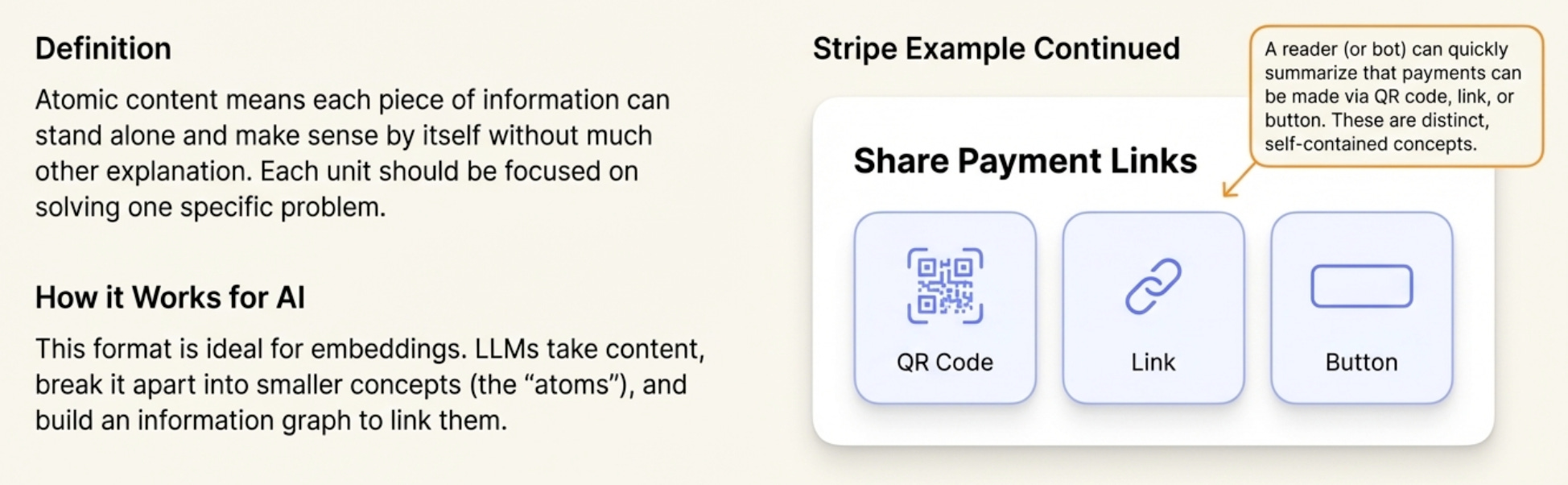
In our payment introduction, reviewing the option to Share Payment Links gives you a quick list of the places you can use and review payment links. A reader (or a bot) quickly summarizes that you can take payment via QR code, link, or button; and that that these links can be served by any of the payment methods (like Google Pay and Apple Pay).
The basic content on the page is reinforced by the building blocks of the service (button, link, account, payment intent, subscription, one-time payment). That information graph is already evident in the way the documentation page is constructed.
AI can read this and avoid hallucinations because the base context -- providing payments to b2b customers -- is easily linked to domain expertise (how you provide payments) and individual questions (where do you pay and how do you know a payment has completed).
You need to build this core knowledge architecture into your docs to deliver great documentation answer with an AI chatbot.
Create wayfinding points in every content object
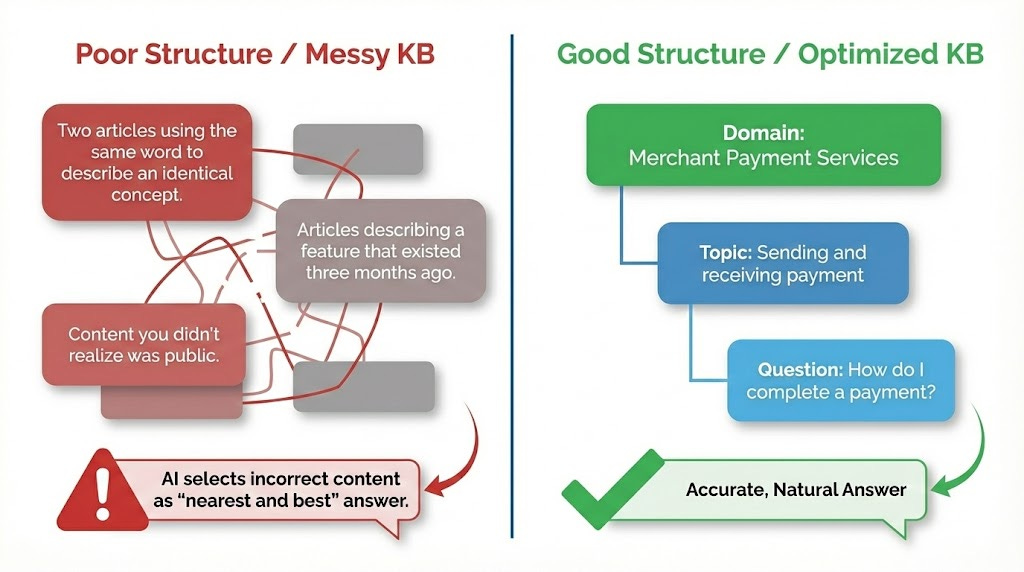
The solution? The equivalent of the “claude.md” file for a human - the ability to get context when you have no memory. In knowledge base articles this is the “bread-crumb” of links from question > topic > domain letting you know know that “how do I complete a payment” is part of “Sending and receiving payment” and is part of “Merchant Payment Services” as a domain.
Each article in your knowledge base typically has tags - topic words that group like articles - and a section or concept to arrange those articles. Your topics might look like “Getting Started” or “Payment topics” if you’re Stripe. For other businesses, the topics might look different.
But the point here is that at the starting point of waking up and reviewing an article or article fragment, both a person and an AI would have a basic idea of the current step and what the next step might be in a process. Reading the article gives you context, direction, and velocity. It helps you know whether you are at the start, middle, or ending of a task.
And if you don’t know where you are, it’s tough to know where you’re going.
What do you do if you get a weird answer from AI?
The next logical question here is to wonder what to do when AI “hallucinates”. We’re defaulting to calling it that when we get unexpected answers to a question because the answer content is related to some other content. To AI, this is nearest and best content. To a human, it might appear to be quite odd.
In either case, a hallucinated or incorrect answer is much more often the result of mismatched, overlapping, or incorrect help content than it is hallucinating AI. If you’re talking to an AI model directly, you are closer to the actual source of the text generation. When you are sending and receiving messages with an AI chatbot, there are a lot of application layers between the input and the base model.
The likelihood of you encountering a hallucination is much lower than the likelihood of finding incorrect content. Articles describing a feature that existed three months ago that doesn’t exist now. Two articles using the same word to describe an identical concept. Maybe even content that you didn’t realize was public in your knowledge base.
The AI chatbot is the best quality control you’ve ever had for your knowledge base, but not in the way you expected.
How do you optimize the knowledge base for AI?
So how do you create a solid customer experience when answering questions using a chatbot? Focus on the same experience you would for a reader:
Articles need to be focused on a problem the user needs to solve (”How do I? ....)
Topic pages should collate like intents (”I’m trying to ...”)
The content needs to be atomic, letting you know all that you need to know to solve a problem; and when there’s a related problem, letting you know other related articles
Said differently, a person with a question needs to be able to ask the knowledge base that question in a search and receive a reasonable answer in the first few results. Reading that result, that person can perform the action and succeed to a high level of accuracy. Reading multiple articles in the same section, that person needs to find consistent terms and defintions linking the current article to other like articles.
Wait a minute. Instead of talking about how to build your knowledge base for AI, we’re talking about information architecture in general. That’s right - the priniciples for building content haven’t changed. The thing that changed is the process or pipeline for retrieving that information from a taxonomy and reframing it or stating it in an easily digestible format.
When you think about it that way, LLM search is another form of the same indexing we have done in the past for search. By adding context to that search in metadata and embeddings, we improve the similarity score for an answer. The main difference now is that answer appears as a multimodal output rather than an URL of the highest scoring thing.
What’s the takeaway? Building your knowledge base for AI is a revised version of the process you should have already been doing. Finding missed searches, identifying the best answer in the shortest number of clicks, and composing great content is a great recipe. What’s different in the age of AI is that we’re finding gaps based on the questions people ask and the answers that are composed rather than just having missed search counts.
Links for Reading and Sharing
These are links that caught my 👀
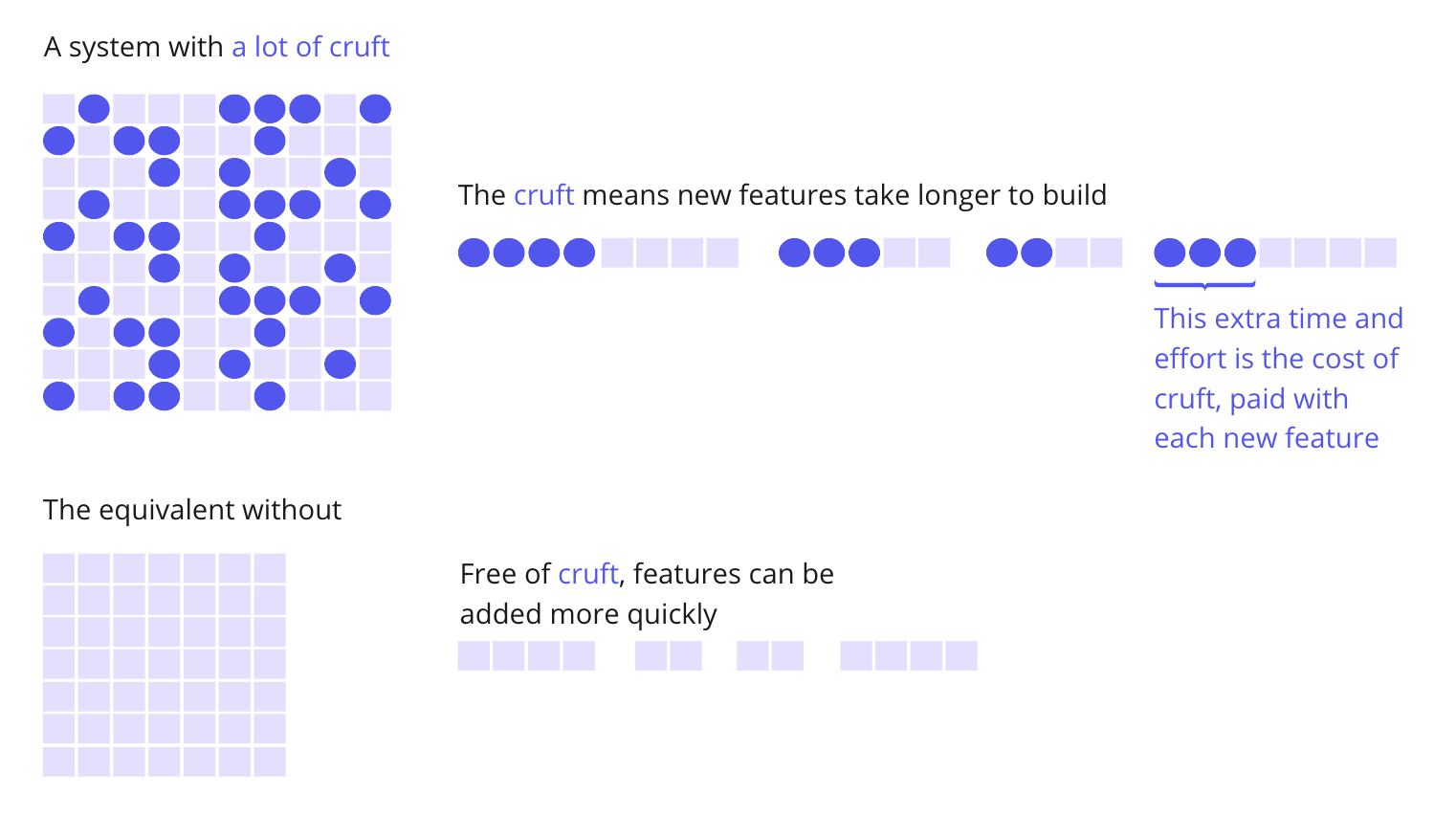
1/ Tech debt compounds - Dave Baines nicely summarizes the problem of “kicking the can” in software development and writes about tech debt here. In the article, he shares this excellent infographic from Martin Fowler displaying how past decision debt weighs down future progress.
2/ On writing - I loved this essay on blogging, even if I’m being lazy by using the phrase “I loved.”
3/ Naming your drives - If you’ve had a Windows machine, you might wonder how drive letters are set. You might also wonder if you can name those drives something other than letters A to Z….
What to do next
Hit reply if you’ve got links to share, data stories, or want to say hello.
The next big thing always starts out being dismissed as a “toy.” - Chris Dixon