


Hi, I’m Greg 👋! I write weekly product essays, including system “handshakes”, the expectations for workflow, and the jobs to be done for data. What is Data Operations? was the first post in the series.
This week’s toy: a similarity tool to compare movies. It’s not Six Degrees of Kevin Bacon, but it’s a clever way to use edge comparison between multiple attributes of a object (movie) to build a similarity score, giving you the ability to bet: if you like Free Guy, you might like Ghostbusters. (You can see many parallels here for look-alike data.)
Edition 303 of this newsletter is here - it’s June 1, 2026.
Thanks for reading! Let me know if there’s a topic you’d like me to cover.
The Big Idea
A short long-form essay about data things
⚙️ Your chat should actually get work done
You’ve met AI as chat. It looks like Claude in the sidebar, or ChatGPT in a tab, or perhaps a Sparkle icon. The first interaction feels magical —> you type something, and get a response that almost seems like a conversation (even though it’s the most likely next mathematical match).
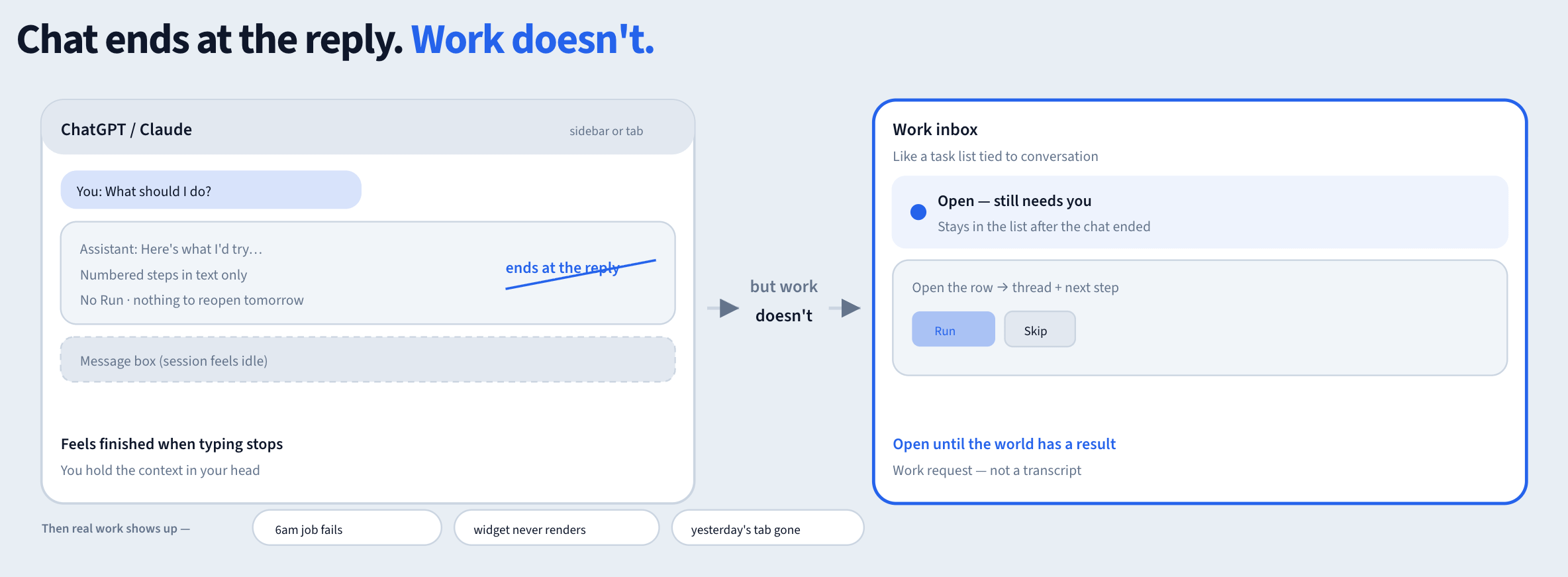
When the model stops typing, the interaction feels finished. Multi-turn only makes the illusion stronger. Twenty messages in, same signal: the work is the conversation, and the conversation ends at the reply.
Then real work shows up, and that context thread is gone somewhere that you can’t recover.
What happens when an ops job fails at six in the morning? What happens when you have a novel problem that haven’t been solved before.
You need something that stays open until the world has a result based on an iterative path to improve your critical thinking and a place to see that result without holding the whole stack in your head.
I’d propose that a regular Chatbot can’t do that process, because it doesn’t know enough about your process and about you to give you truly good advice. Yes, it’s possible to build context maps, short term memory, and write skills for your agent in Markdown. But this is not real advice.
What you really want is a way to provide observability for the regular work requests that happen every day and also end up touching the real work that you do. You want to combine the flexibility of LLMs with the deterministic outcome of real work completions.
Chat is a transcript. An inbox thread is a work request.
What chat quietly drops
Chat wins the process of exploration, where you create drafts, brainstorm, and ask “what would you do here?” types of questions.
It doesn’t matter if your chat ever goes anywhere, really. But if you want to apply your model to Operations? You’d better arrive with data (and a Standard Operating Procedure that can adapt to whatever arrives).
Your chatbot model might promise that it will search the catalog, kick off a task, or get something done. But a real work inbox needs to give you an actual Run button that stores a record of whether it ran or not.
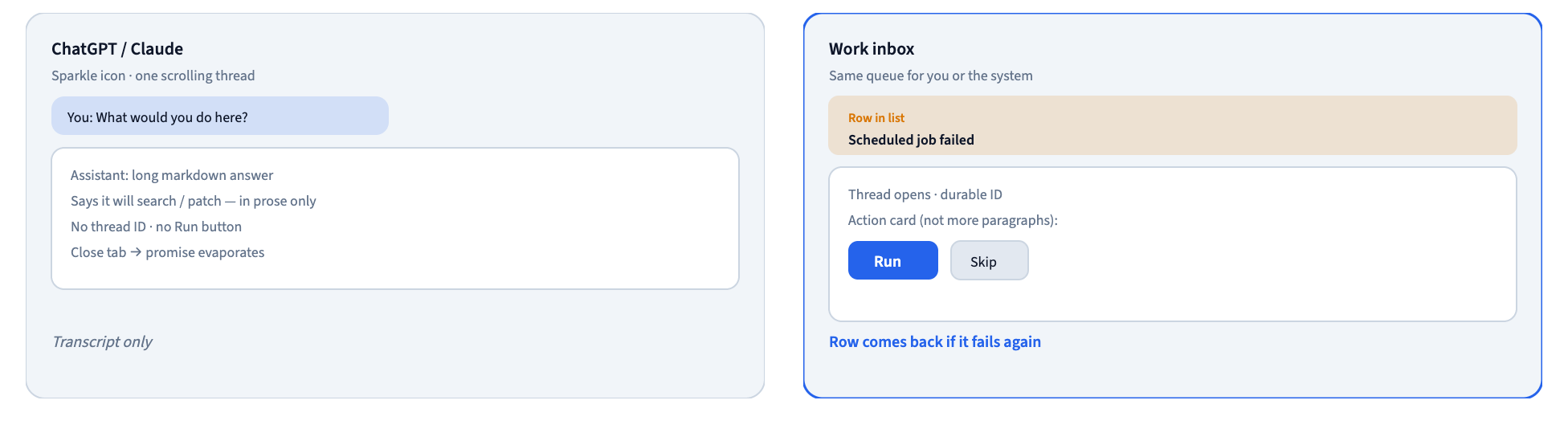
AI optimizes for a relatively short session that ends when the reply stops. The work is still waiting for you to remember it.
A truly useful assistant optimizes for a request that ends when you know the outcome, or when the system tells you because you are the Human In The Loop, that it needs a click that only you can approve.
A thread is not “more chat”
Some tasks need a second look, and others are wasteful (and maybe more expensive) if you ask a human to give their opinion.
To practice identifying which decisions need real input vs. those that are ok for a bot to keep moving along, I’ve been building a local playground called some-useful-agents. The purpose of this exercise is to build (from basic prototype shapes) all of the pieces necessary to run agents.
You need to be able to author the agent, give it a prompt, know what sort of tools it can run, and perhaps even tell it which model to use or which areas of the site it can touch.
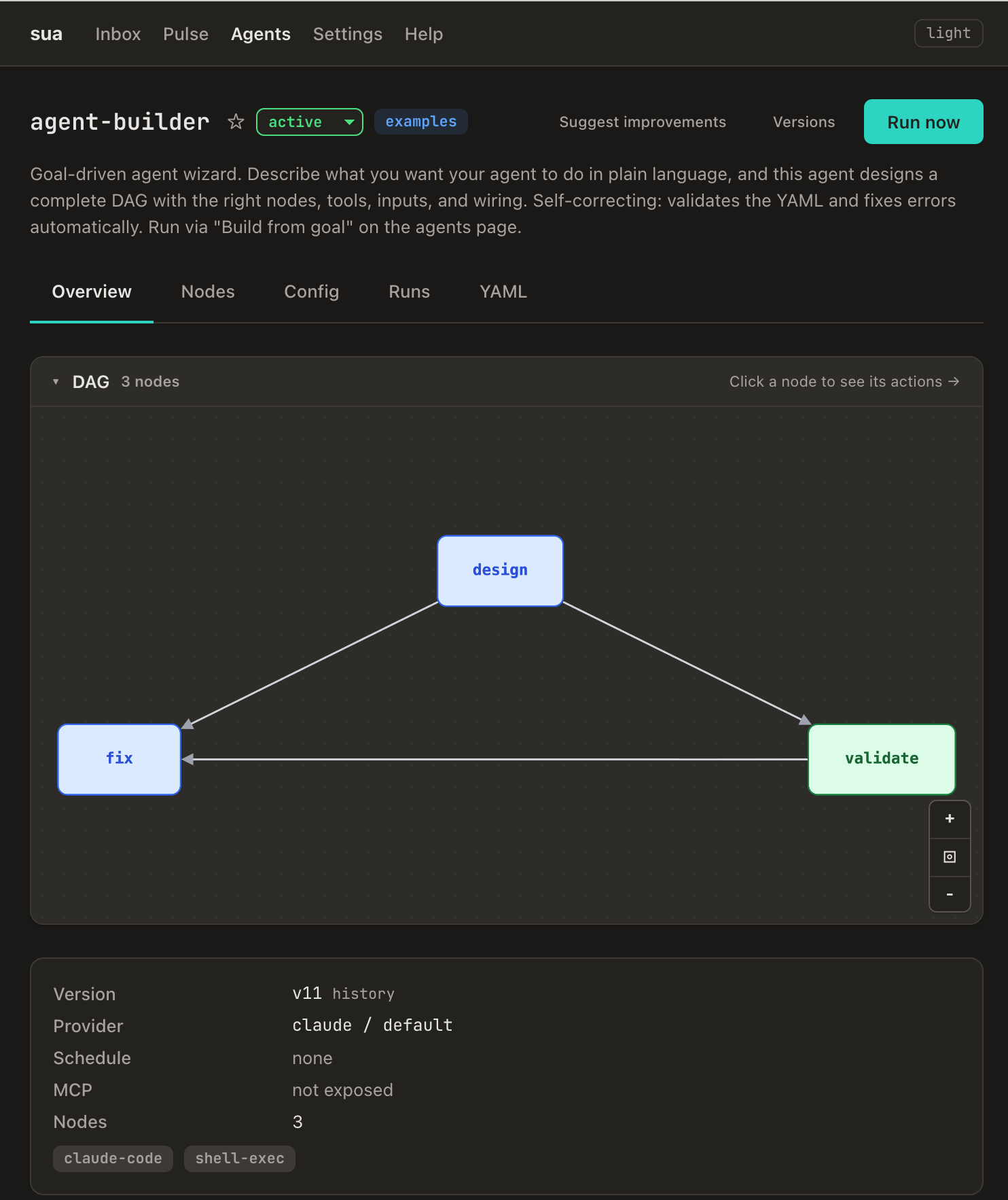
For example, you might create a prototype agent-builder that other agents can call to get an answer to a question.
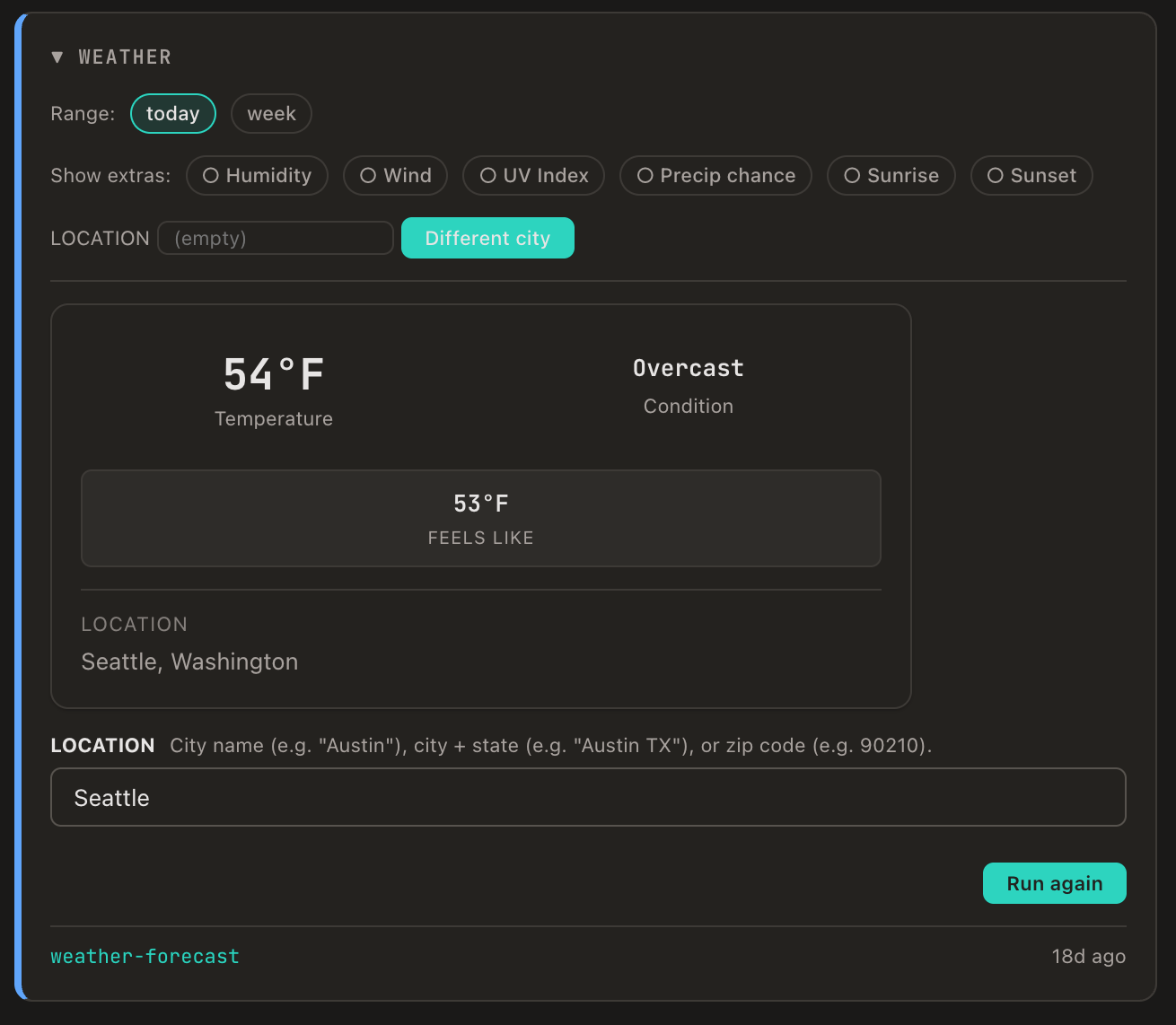
The outcome of that Agent-Builder run? It could be a response with no output, or it might be a Dashboard tile like this weather report.
That agent-builder doesn’t work by itself. It only works because it’s part of a deterministic pipeline that ends up being a cadence to execute code, or a trigger to run a prompt against an LLM that produces a known result.
Ultimately that system agent is part of a system that you’re asking to do work and to be accountable for the result.
How do you talk to a system?
I’m using the abstraction of an Inbox to have conversations with agents. Why an inbox? It feels familiar to post a question and get an answer, and when it has context (the agent responds in a way that matches what I expected) the answers can be surprisingly effective, almost like a coworking.
How could it work? Let’s spin a story …
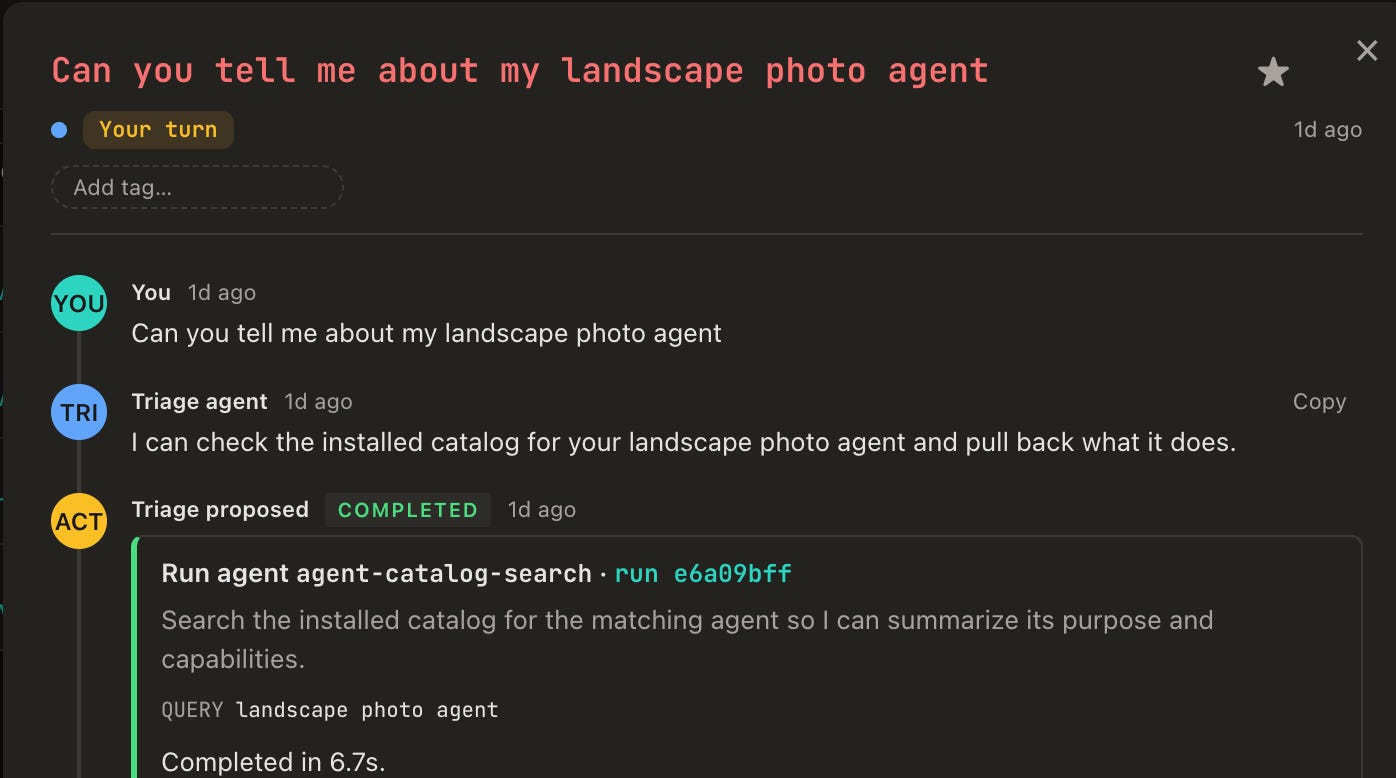
A concierge shows up — not with a “how can I help,” but by offering triage on the question you asked and proposing the next allowed step. Unlike a standard chatbot, the goal is not to do anything you want but to guide you to a series of decisions bound to an action card. The Agent is trying to drive commitment meaning a generated Run/Skip card with real inputs, or a clear limit.
Imagine that that you can ask for help and your personal triage agent has a catalog of all of the other allowed agents in the system, giving a defined world instead of an “anything goes” MCP server hooked up to every tool you have.
When you suggest something, it becomes a trace that results in a job with history. When it fails, the thread should say so where you triage — not three clicks deep in a log viewer you only open when you are already annoyed.
Managing a request backlog in real time
Product Managers already manage a cadence of create, assign, tooling, reporting, and escalation. That happens today in Slack threads and spreadsheets, mostly.
The inbox makes that pattern visible in software. The “assignee” can be a concierge plus helpers; the “status” should be honest about whether something actually ran.
Calling the whole thing an “Agent” undersells the job.
The inbox is the window to action:
can we do this?
who does it?
what happened?
do you need to click?
When the system finds you
The first path to action happens when you don’t expect it. Something in the stack breaks on a schedule, and the inbox is how the playground tells you.
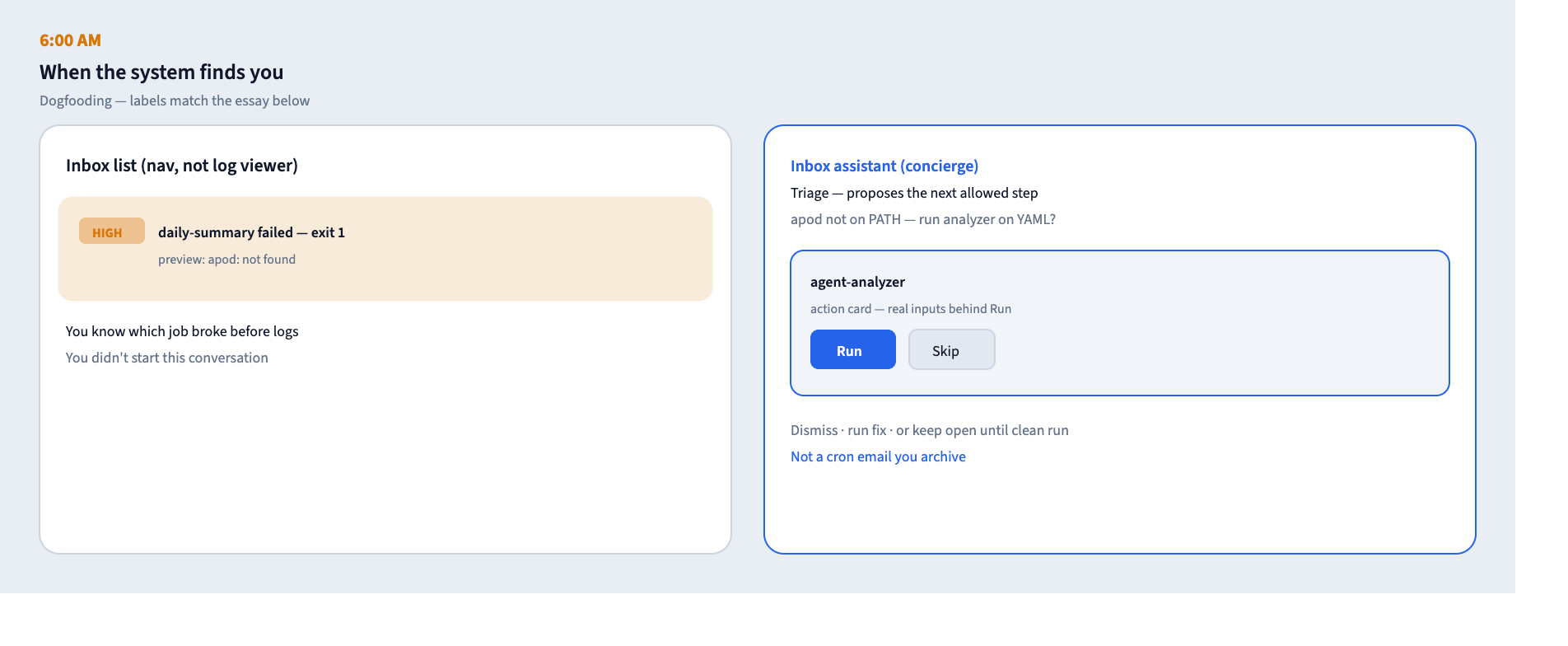
When you open your Inbox, a message is waiting, not from a teammate, but from an Agent:
Row:
daily-summary failed — exit 1— HIGH priority, expected outcome: not found.
You get specific information on what happened and where to remediate it. This is very similar to the observability stack most engineering teams maintain, except this is related to the abstraction of product.
Why does this matter? For anyone designing “AI features,” they need to know where the completion signal lands so that they can close the loop with the customer.
When you start the thread
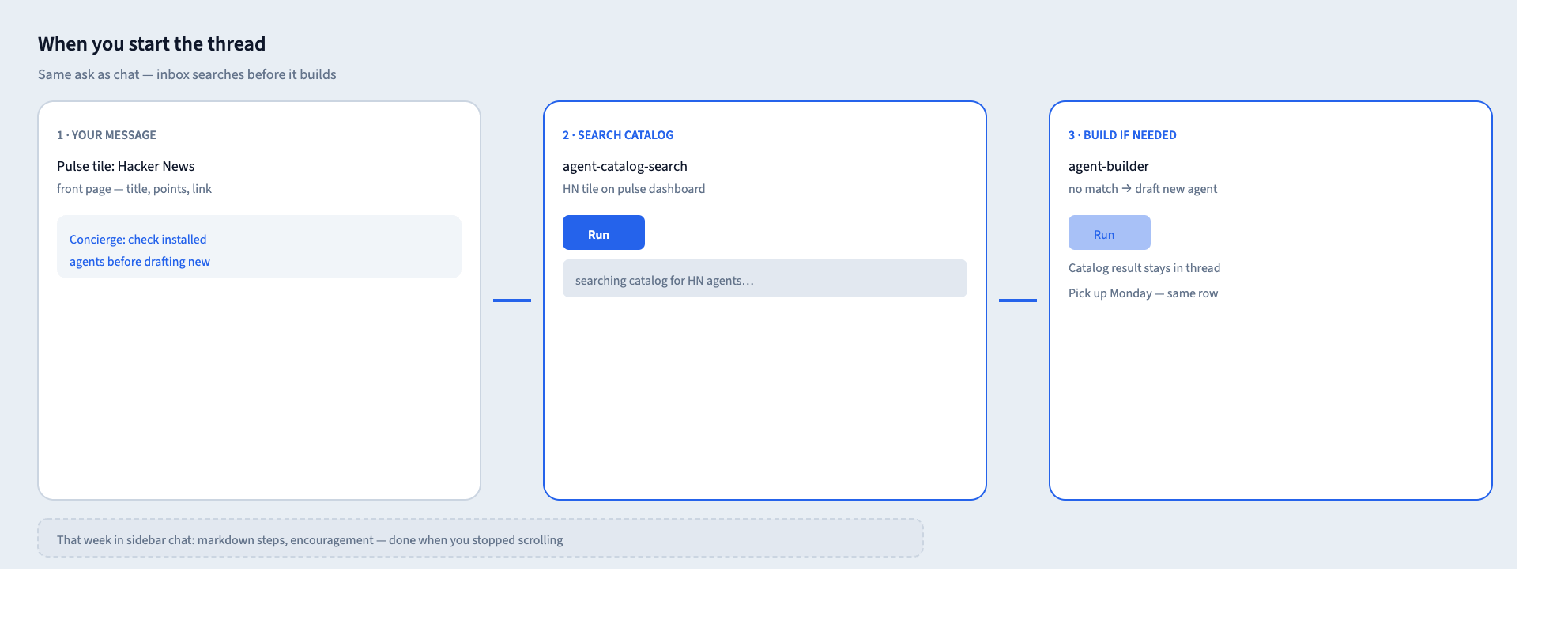
The second path starts the way most people expect — you have a goal, you open a conversation, you describe it in plain language. The difference is what the inbox does with that goal afterward.
You: I want a pulse tile that shows the Hacker News front page — title, points, link. Nothing fancy.
Concierge: Let me check what’s already installed before we draft anything new.
If there’s no match, the concierge offers a second card to build the thing I wanted — agent-builder — and the thread still has the catalog result in the record if I come back tomorrow.
This is becoming a self-reinforcing system.
How do we ship this UX for customers
An inbox with a multi-turn assistant is not chat in a ticket queue. It is a chat provider plugged into work management — which means Slack and email expectations whether you want them or not.
There are some additional items that need to be worked out:
Building trust that you are doing the right thing. It’s tempting to just let the Agent do things, but hard to do that if you’re not sure what will happen. My hypothesis is that building a “plan” mode helps the user to see what they’re getting into, and will build trust over time.
Use progressive disclosure. It’s not normal (yet) to have a personal AI assistant, so you need to show what’s possible in small chunks until the user asks for more.
The bar for success is not necessarily a smarter model. It is messaging UX people already know, with execution tucked behind the click.
Real talk about agents
I’m not describing a finished product category, but making a thesis based on an experiment I’m running of long-term threads of work that cross different areas of work in a system. The bet is that by building a pile of repeatable modules, we’ll find an interesting outcome. Right now, I have enough surface area to start “dogfooding” cases and seeing if they stick. It is not enough to declare victory.
The ambition still points somewhere. The same queue I’m describing could solve a lot of different problems and we don’t yet know whether it’s useful.
Start with one recurring interruption
How do you get started when you’re thinking about agents, what they do, and how they respond? Pick one recurring interruption on your team. It might be the report that fails quietly, the approval that stalls, the widget that breaks on third-party data.
When you look at this problem, consider:
How do you know it is new (signal, not hope)?
What does done for an agent look like (artifact, not “model replied”)?
What should Run (the SOP) do on your behalf?
If you cannot answer the third question, you’re building a chatbot, not an observable system.
What’s the takeaway? When you’re building an assistant, multi-turn chat makes the session feel finished when the reply stops. Work isn’t finished until the world has a result. Give recurring interruptions an inbox row, a durable thread, and a Run button, then define what “done” means before you count turns as successful.
Links for Reading and Sharing
These are links that caught my 👀
1/ How do they make money building houses? - You might have wondered: do developers (the building kind) make money on building a single house? If they are doing bespoke designs, sure. But the money is made (and risked) in multi-family developments. How much scale do you need?
2/ AI marches on - Benedict Evans does a technology presentation every year - this year’s is called AI Is Eating the World. Take a look and zoom out to see the trends. One of them is that Capex can’t continue forever.

3/ Classic OS designs - Need suggestions for timeless design? Look at these examples from the early days of computing. It turns out that having constraints (fewer pixels, colors, and fonts) drives design decisions that hold up pretty well today.
What to do next
Hit reply if you’ve got links to share, data stories, or want to say hello.